
Financial Decision Kit
A 13-week Excel cashflow engine for operators who need to see cash pressure before it becomes a problem.
No bank link. No subscription. Setup in minutes.
Includes blank workbook, example workbook and quick-start guide.
Requires Microsoft Excel. Instant digital delivery.
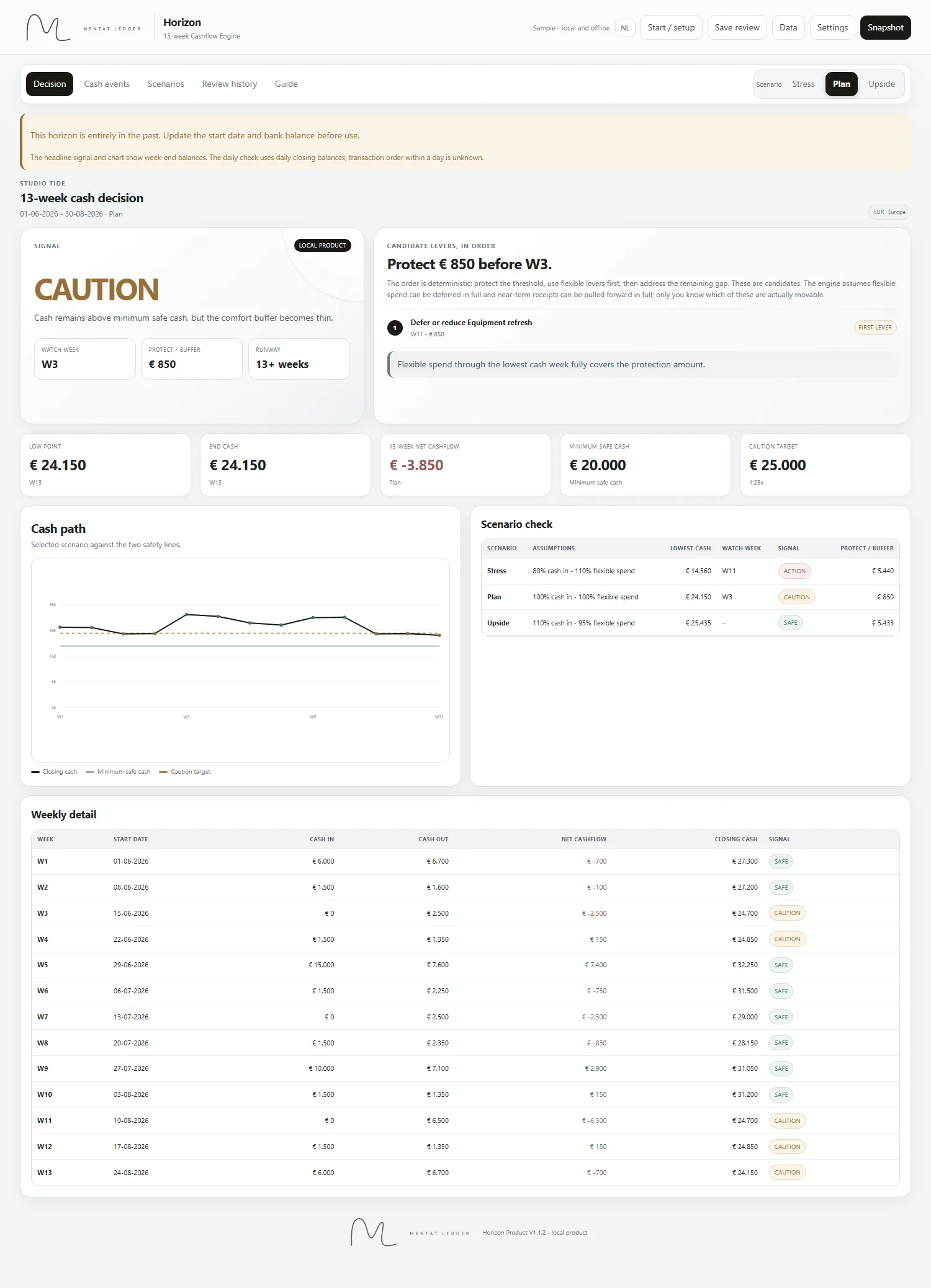
Cashflow Engine v1.0 · Dashboard
Upside scenario · SAFE signal · EU format · Example workbook
One Decision, Every Week
The dashboard reads your numbers and returns one of three signals. No tab archaeology. No manual calculation.
No cash protection needed. Keep running, keep checking.
Cash is above the minimum but below the caution target. Collect earlier, delay flexible spend, protect the buffer before the watch week.
Immediate levers needed. Collect earlier, cut flexible spend, reduce cash out, or add cash. The watch week and protect amount tell you exactly how much and when.
Launch Pack
Engineered for operators who need answers, not another login. One file. Enter your cash events, read the dashboard, see your position. One clear signal whenever you need it.
Inside the Engine
The Inputs
02 Inputs sheet · EU format · Example workbook
The Forecast
All three scenarios · 13-week detail · EU format · Example workbook
Built For Operators
How It Works
Open the Inputs sheet. Enter what comes in and what goes out: retainers, rent, payroll, one-off payments. Set your minimum safe cash. First setup takes about ten minutes.
Switch to the Dashboard. See your signal, watch week, and cash protection amount across Stress, Plan and Upside simultaneously. No digging through tabs.
If the signal says CAUTION or ACTION, you know exactly which weeks are tight and how much to protect. Collect earlier. Delay flexible spend. Reduce cash out. You have weeks to act not days.
Questions
Current week plus 12 weeks forward. Long enough to act on what you see. Short enough to stay accurate. Beyond 90 days your assumptions erode faster than the insight is worth.
Excel only. Best in Excel 365 desktop. The file is not built for Google Sheets or Apple Numbers. Formulas and layout will not behave the same way.
Once a week. Five minutes if your cash events are clean. Open the Inputs sheet, move any delayed cash events to the correct week, update actuals, and check the dashboard signal. That is the full weekly routine.
Yes. The input structure is yours to adapt. Formulas are protected by default to prevent accidental damage. Single-business licence covers one organisation.
No. Cashflow Engine is decision support based on assumptions you control. Results depend on the accuracy of the data you enter. For tax, compliance or accounting questions, consult a qualified professional.
Email mentatledger@outlook.com with your order reference and a description of the issue. We investigate and may provide a corrected file for confirmed defects in a supported Excel environment.
Cashflow Engine v1.0 · Launch Pack
Buy once. Download instantly. Add your numbers. Decide.
No bank link. No subscription. No recurring fees.
Built by a financial engineer. Stress-tested on real operator cashflows.
Includes blank workbook, example workbook and quick-start guide. Requires Microsoft Excel.
Final sale after download access is provided, except where required by applicable law.